Alex Rivera | Logout

Enable remote connections for SQL Server Express 2012

Asked 2012-06-30T22:21:33.927
408

I just installed SQL Server Express 2012 on my home server. I'm trying to connect to it from Visual Studio 2012 from my desktop PC, and repeatedly getting the well-known error:

A network-related or instance-specific error occurred while establishing a connection to SQL Server. The server was not found or was not accessible. Verify that the instance name is correct and that SQL Server is configured to allow remote connections. (provider: Named Pipes Provider, error: 40 - Could not open a connection to SQL Server)

What I've done to try to fix this:

  • Run SQL Server Configuration Manager on the server and enable SQL Server Browser
  • Add a Windows Firewall exception on the server for TCP, ports 1433 and 1434 on the local subnet.
  • Verify that I have a login on the SQL Server instance for the user I'm logged in as on the desktop.
  • Verify that I'm using Windows Authentication on the SQL Server instance.
  • Repeatedly restart SQL Server and the whole dang server.
  • Pull all my hair out.

How can I get SQL Server 2012 Express to allow remote connections!?
Edit
Report

3 Answers

111

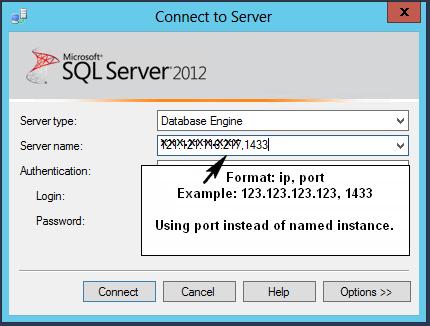
The correct way to connect to remote SQL Server (without opening UDP port 1434 and enabling SQL Server Browser) is to use ip and port instead of named instance.

Using ip and port instead of named instance is also safer, as it reduces the attack surface area.

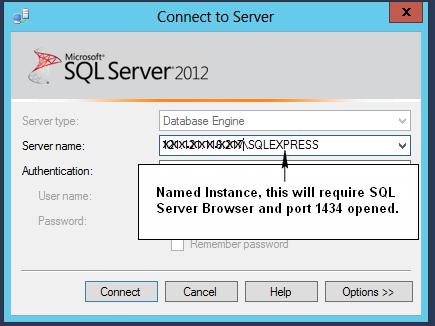
Perhaps 2 pictures speak 2000 words...

This method uses the specified port (this is what most people want I believe)..

enter image description here

This method requires opening UDP port 1434 and SQL Server Browser running..

enter image description here

answered 2013-06-04T17:02:25.773
19

You can use this to solve this issue:

Go to START > EXECUTE, and run CLICONFG.EXE.

The Named Pipes protocol will be first in the list.Demote it, and promote TCP/IP.

Test the application thoroughly.

I hope this help.

answered 2013-05-20T04:22:21.643
1

I had a different problem from what all of the answers so far mentioned!

I should start off by saying that I had it in Visual Studio, and not SQL Server Express but the solution should be exactly the same.

Well, god, it's actually really simple and maybe a bit foolish. When I tried to create a database and Visual Studio suggested the name of the SQL Server it gave me my Windows username and since it's actually the name of the server I went for it.

In reality it actually was my Windows username + \SQLEXPRESS. If you didn't change any settings this is probably yours too. If it works, stop reading; this is my answer. If it doesn't work maybe the name is different.

If, like me, you only had this problem in Visual Studio to check what is yours follow these steps:

  1. Open SQL Server Management Studioicon.
  2. If you don't see your server (docked to the left by default) press F8 or go to View -> Object Explorer.
  3. Right click on the name of the server and choose Properties (The last item)
  4. At the bottom left you can see your server's actual name under "Server" (not Connection, but above it).

This is the name of the server and this is what you should attempt to connect to! not what Visual Studio suggests!

answered 2013-01-24T12:20:41.417

Your Answer