The following snippet:
<Window x:Class="Window1"
    xmlns="http://schemas.microsoft.com/winfx/2006/xaml/presentation"
    xmlns:x="http://schemas.microsoft.com/winfx/2006/xaml">
    <Grid>
        <StackPanel Orientation="Horizontal"
                    VerticalAlignment="Center"
                    HorizontalAlignment="Center">
            <Label Content="Name:"/>
            <Label Content="Itzhak Perlman" FontSize="44"/>
        </StackPanel>
    </Grid>
</Window>
Renders the following:
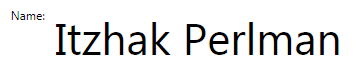
Is there any way I can set in the Labels' styles so that their text bottoms should be aligned?
I have the same question with TextBlocks as well.
NOTE: since I've been struggling with this issue for a while, please post only certains answers that you know that work.
I already tried: VerticalAlignment, VerticalContentAlignment, Padding, Margin. Is there anything else I am not aware of?
I've read this post, but it doesn't talk about a scenario of different font size.
UPDATE: The problem is, that even Padding is set to 0 there is still an indeterminate space around the font, within the ContentPresenter area. this space varies on the font size. If I could control this space I would be in a better situation.
Thanks