10
I have a script which inserts "popup" elements into the DOM. It sets their top and left css properties relative to mouse coordinates on a click event. It works great except that the height of these "popup" elements are variable and some of them extend beyond the viewable area of the browser window. I would like to avoid this.
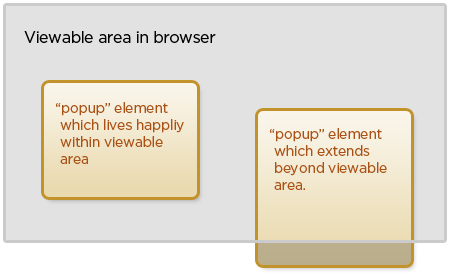
Here's what I have so far
<script type="text/javascript">
    $(function () {
        $("area").click(function (e) {
            e.preventDefault();

            var offset = $(this).offset();
            var relativeX = e.pageX - offset.left;
            var relativeY = e.pageY - offset.top;

            // 'responseText' is the "popup" HTML fragment
            $.get($(this).attr("href"), function (responseText) {
                $(responseText).css({
                    top: relativeY,
                    left: relativeX
                }).appendTo("#territories");

                // Need to be able to determine
                // viewable area width and height
                // so that I can check if the "popup"
                // extends beyond.

                $(".popup .close").click(function () {
                    $(this).closest(".popup").remove();
                });
            });
        });
    });
</script>