Alex Rivera | Logout

Android - Activation of the system key lock (aka lock screen)

Asked 2009-04-09T10:58:27.383
10

I have to activate android's system key lock (the one you get when you press the power off/hang up button). See here:
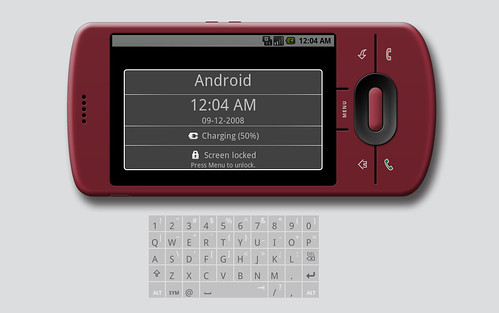
img

I already browsed the docs but everything I found was PowerManager and KeyguardManager. Both seem not to be the solution :-(.

So, does everyone know how to achieve that from a android application? (If special permissions are required, that is no problem but changing the device's settings is not a solution...)

EDIT: Or does someone know that this is definitely not possible at all? Btw. craigs solution with sending keys does not work anymore (see comments).

Edit
Report

1 Answer

1

Looks like the screen lock function is performed using the method:

public void goToSleep(long time)

method in PowerManager.java. It's possible to get a reference to it in this fashion:

PowerManager pm = (PowerManager) getSystemService(Context.POWER_SERVICE);

However this requires the permission

android.permission.DEVICE_POWER

which is a level 2 permission available to the system only.

So looks like this isn't doable. This is for version 1.1 only, I don't know for 1.5.

answered 2009-04-20T17:33:50.323

Your Answer