I have a set of points and each one has an area of "influence" or essentially a radius. I would like to be able to draw each one of these influence circles for all the points as a simple circular line.
They will overlap however I wish to draw the outside of the shape formed. I know this would probably require me working out where they intersect and somehow forming a total shape to draw. The problem is that some points might not even touch others! So I need to be able to work that out too.
I have attempted to illustrate what I mean simply:
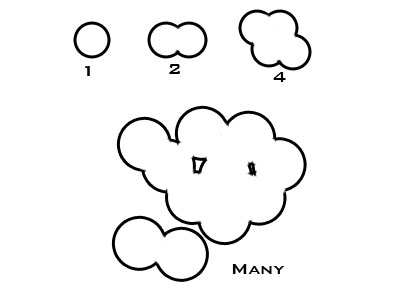
Note that I wish to draw simply the black line, no fill. This is because I wish background images and other geometry to show through.
I would be doing this in openGL so the circle would be probably made using GL_LINES or some such with various vertices forming the curves but I really just don't have any idea about how I would work out this perimeter.
If anyone has any advice or could point me at how I might go about working this out it would be greatly appreciated!
This might be more of a maths question, I am not looking for bits of code but actually how to go about working out these shapes. I just can't think about how to do it!
*****Edit: with the solution I came up with, hopefully might help someone else!
So I used the suggested ideas and basically decided the best way would be to draw using the stencil buffer. This now means that I loop through my points 3 times but I need to do some careful sorting of them to find only visible ones anyway.
So code wise I now have this:
private void stencilCircleAroundStars()
{
    //Lets try and draw something here using stencil
    glColorMask(false, false, false, false); //Disable colour mask
    glEnable(GL_STENCIL_TEST); // Enable Stencil Buffer For "marking" the outer circle
    glDisable(GL_DEPTH_TEST);// D