22
When I select (by clicking or by keyboard) blank row on my DataGrid (when I want to add new row), unexpected validation error occurs (but with no exception) - the border of datagrid changes to red color, as you can see on the image below. When I click second time on blank row, the red border dissapears. Everything other works fine, the new row is added. Besides, I don't have any validation rules. And when I make a row with empty text, value is valid.
I don't want this behavior and this red border, anybody knows, why this happens and how to fix it? Why and where some validation fails?
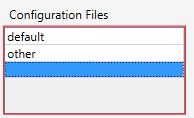
Below I append some source code:
DataGrid definition in xaml:
    <DataGrid IsSynchronizedWithCurrentItem="True" DisplayMemberPath="Name"
 ItemsSource="{Binding Path=ConfigFiles}" SelectedItem="{Binding Path=SelectedConfigFile}"
              Grid.Column="1" Height="87" Margin="0,26,11,32" Style="{DynamicResource DataGridStyle}">
        <DataGrid.Columns>
            <DataGridTextColumn Width="1*" Binding="{Binding Name}" />
        </DataGrid.Columns>
    </DataGrid>
My ViewModel's part:
public class ManageModulesVM : BaseVM  // Implements INotifyPropertyChanged
{
    // ...

    public ObservableCollection<ConfigFile> ConfigFiles
    {
        get { return selectedModule == null ? null : selectedModule.ConfigFiles; }
        set
        {
            selectedModule.ConfigFiles = value;
            OnPropertyChanged(() => ConfigFiles);
        }
    }

    public ConfigFile SelectedConfigFile
    {
        get { return selectedModule == null ? null : selectedModule.SelectedConfigFile; }
        set
        {
            if (value != null)
            {
                selectedModule.SelectedConfigFile = value;
            }
            OnPropertyChanged(() => SelectedConfigFile);