Here is a little example for you
void MainFormPaint(object sender, PaintEventArgs e)
{
  LinearGradientBrush br = new LinearGradientBrush(this.ClientRectangle, Color.Black, Color.Black, 0 , false);
  ColorBlend cb = new ColorBlend();
  cb.Positions = new[] {0, 1/6f, 2/6f, 3/6f, 4/6f, 5/6f, 1};
  cb.Colors = new[] {Color.Red, Color.Orange, Color.Yellow, Color.Green, Color.Blue, Color.Indigo, Color.Violet};
  br.InterpolationColors= cb;
  // rotate
  br.RotateTransform(45);
  // paint
  e.Graphics.FillRectangle(br, this.ClientRectangle);
}
here is the result
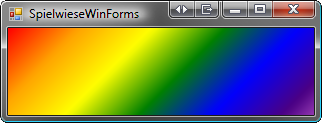
hope this helps
answered 2011-12-06T20:22:05.177