How to Tag a Facebook Business Page on a PC or Mac
Open Facebook on your Internet browser.. Click on the search field.. Search for a business.
Steps
1
Open Facebook on your Internet browser.

Open Facebook on your Internet browser.
2
Click on the search field.
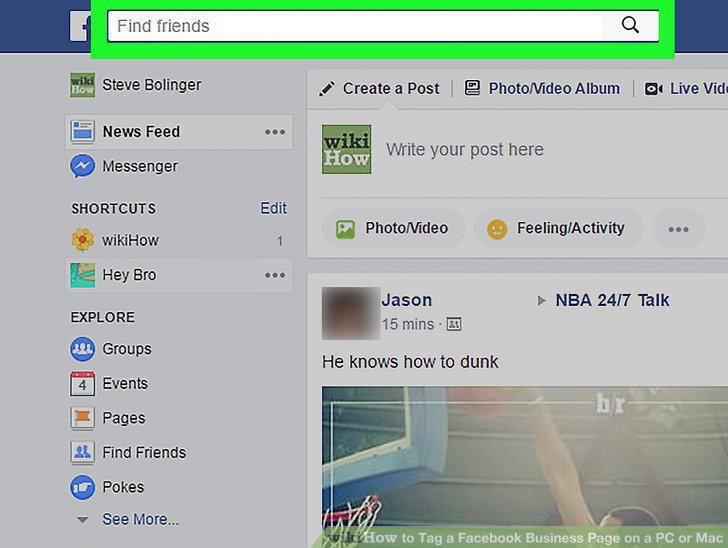
Click on the search field.
3
Search for a business.

Search for a business.
4
Note down the business page name.

Note down the business page name.
5
Click the Home button.

Click the Home button.
6
Click Create a Post.

Click Create a Post.
7
Type @, and then enter the business name.

Type @, and then enter the business name.
8
Select the business you want to tag.

Select the business you want to tag.
9
Tap Post.
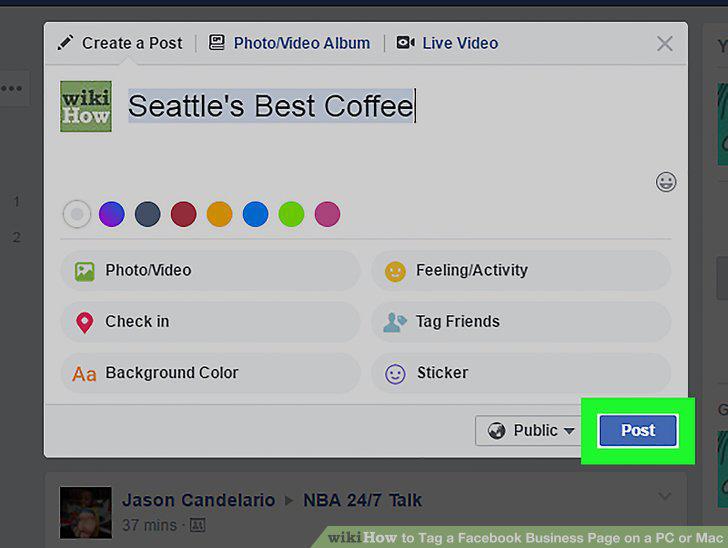
Tap Post.
Comments (0)
No comments yet. Be the first to share your thoughts!