How to Find an Event or Scheduled Room in Clubhouse
Tap the calendar icon.. Tap the drop-down menu.. Tap All Events on the menu.
Steps
1
Tap the calendar icon.

Tap the calendar icon.
2
Tap the drop-down menu.
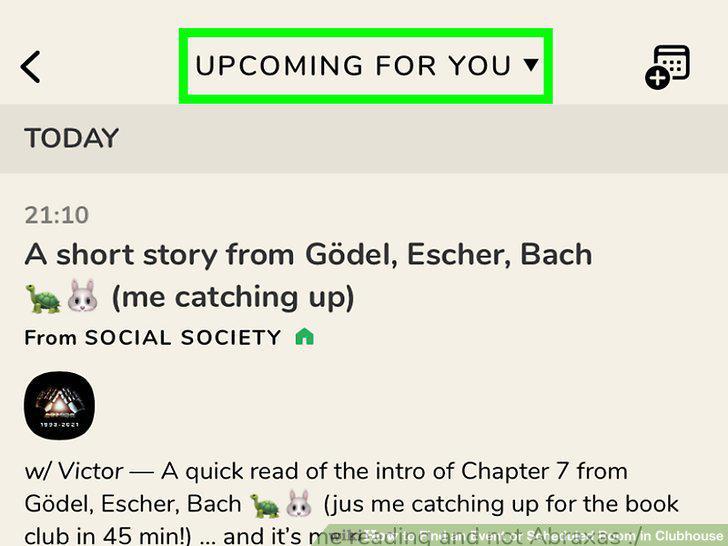
Tap the drop-down menu.
3
Tap All Events on the menu.
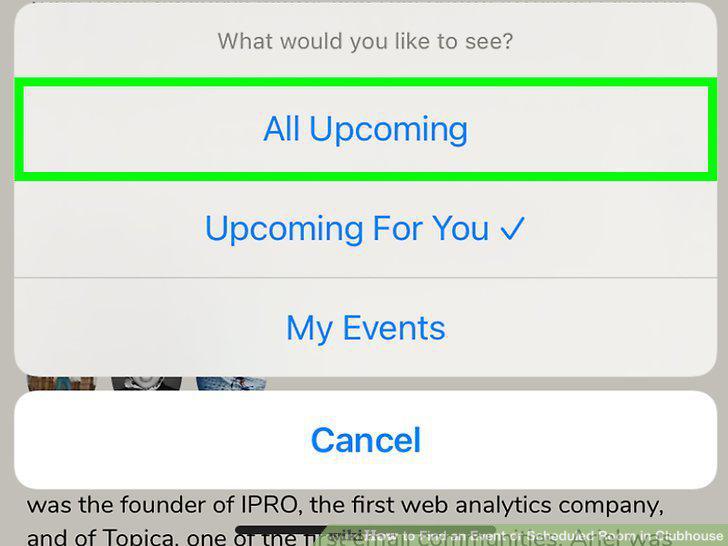
Tap All Events on the menu.
4
Tap an event to learn more about it.

Tap an event to learn more about it.
5
Tap the bell icon to follow the event.

Tap the bell icon to follow the event.
6
Tap Add to Cal to add it to your Google or Apple calendar.

Tap Add to Cal to add it to your Google or Apple calendar.
7
Share the event off of Clubhouse.

Share the event off of Clubhouse.
Comments (0)
No comments yet. Be the first to share your thoughts!